
Touch access
When a touchscreen is hard to use
Cerebral palsy, dyspraxia, tremor, apraxia and other differences in movement can make a touchscreen hard to use. A finger lands next to the key, rests too long, or taps twice. TBoard has settings for this. Here they are in plain words, with the name you'll see in the app and the words a therapist might use.
They change how the board's keys respond, and nothing else in the app or on the device.
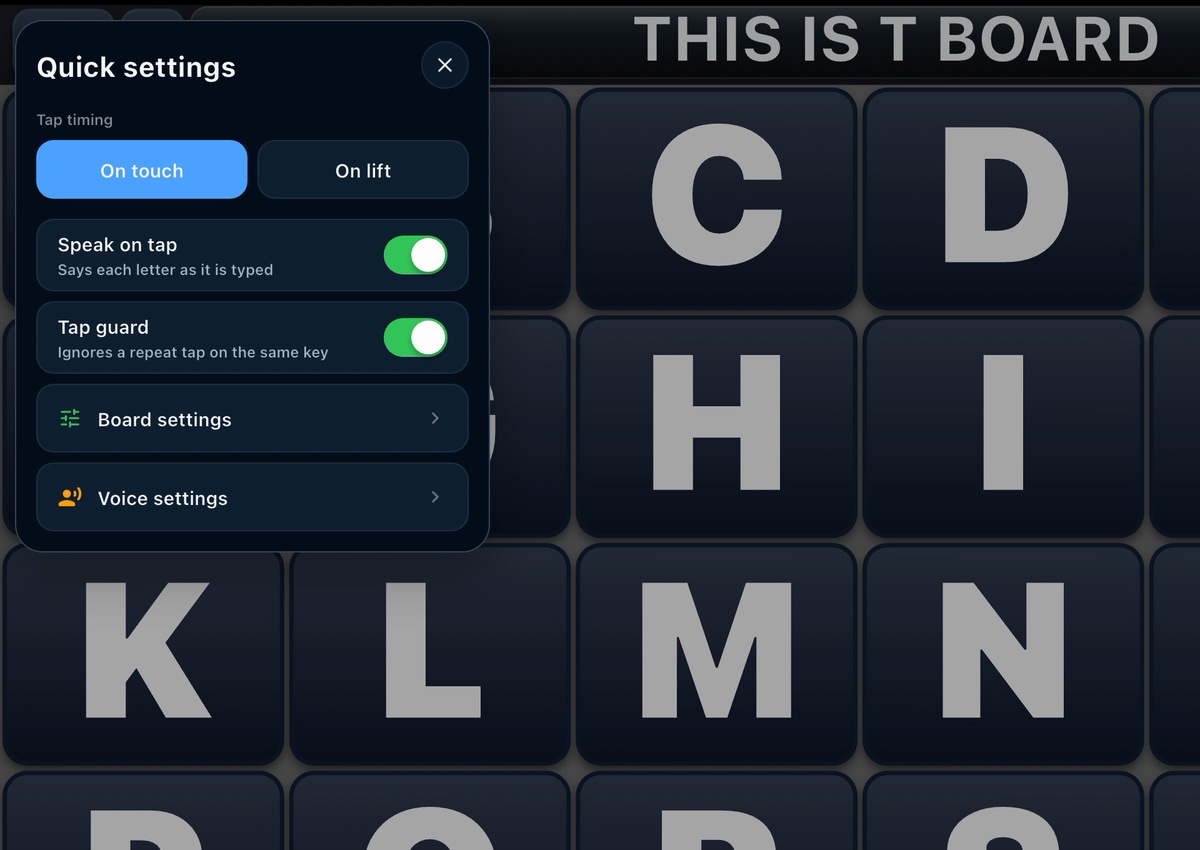
When a key counts: On touch or On lift
In the app this is Tap timing, with two choices.
On touch. The key types the moment a finger lands on it. Sliding or resting afterwards changes nothing. This is the setting TBoard starts with.
On lift. The key types when the finger lifts. If the finger lands on the wrong key, sliding it off before lifting means nothing is typed. A therapist may call this "select on release".
Double taps: Tap guard
After each tap, the board waits a moment before it accepts another. A finger that bounces, or lands twice, types one letter instead of two. A therapist may call this ignoring repeat or accidental touches.
Tap guard is on when TBoard is first installed, and you can switch it off in Quick settings. How long it waits is in Board settings: 0.5 seconds (recommended), 1, 1.5 or 2 seconds. The app's own advice: 0.5 seconds suits most people; lengthen it if taps are still landing twice.
Bigger keys
Fewer keys on the screen leaves room for bigger ones. A therapist may talk about larger targets.

- 3-Stencil splits the alphabet across three panels, A–I, J–R and S–Z, to keep large keys while covering the full alphabet.
- Build your own board with just a few keys: in My Boards, tap Add board and choose Grid of keys. The smallest grid has two keys.
- When you customize a board, Letter size and Key size change the size of the letters and the keys.
Hearing each letter: Speak on tap
Speak on tap says each letter as it is typed, so every letter can be checked by ear without watching the screen. A therapist may call this auditory feedback. It's in Quick settings.
What TBoard doesn't have
TBoard is made for direct touch. It has no switch scanning, head tracking or eye-gaze control, and no hold-time (dwell) setting. If someone needs those, a speech-language pathologist or occupational therapist can help find an AAC system that has them.
Try it free today.
TBoard for iPhone, iPad, and Android phones and tablets.

No tablet to hand?
A printed letter board has no settings, but it's free and it's always ready.